 Zebra Krillion
What happens on card 15?
A Zebra Krillion Unlimited deck currently holds 14 medical prompts across 10 subjects. Start a practice round and the game shuffles all the cards. You’ll see each prompt once before the deck runs out. If you choose Next card at the end of the deck, the game shuffles the whole set again. Your carrot counter keeps running. The first prompt in the new deck will be different from the one you just played.
You can meet the same subject twice before you meet the same question. One cardiology card asks for a disease of the heart. Another asks for a cause of a fast heart rate. Read the whole line before typing. Remembering which of those two questions you’ve already seen can help you decide what to try when cardiology comes around again.
Play a card against the clock
Each prompt gives you 30 seconds. Type one term in Your answer and press Enter or choose Submit. The first accepted answer closes the card and puts its carrots into your total. If the game asks you to try again, the clock is still running. You can edit your spelling or try a different term while there’s time. A list of guesses in the same box is treated as one entry.
For a first pass through the deck, try giving the first answer you’re confident about. Look at the tier on the recap before moving on. When the prompt returns, try a less familiar term and compare the two scores. A Pre-med answer earns 10 carrots, Med Student earns 25, Resident earns 50, Attending earns 75 and Professor earns 100. Once you submit a match, the recap gives you time to think about your next attempt.
If a prompt draws a blank, choose Skip card. A skip or a timeout gives you zero carrots and the recap shows one accepted answer. Read it before you move on. This is particularly handy on prompts asking for a condition beginning with a certain letter. Try recalling that example without looking the next time that letter comes up.
A 15-card result, read two ways
In the round pictured below, each of 15 answers earned 25 carrots. At the end of the first deck the running total was 350. The next card added another 25, so choosing Finish round recorded 375 carrots and earned a Zebra. Crossing the 340-carrot Zebra threshold didn’t end the round automatically. You choose when to stop.
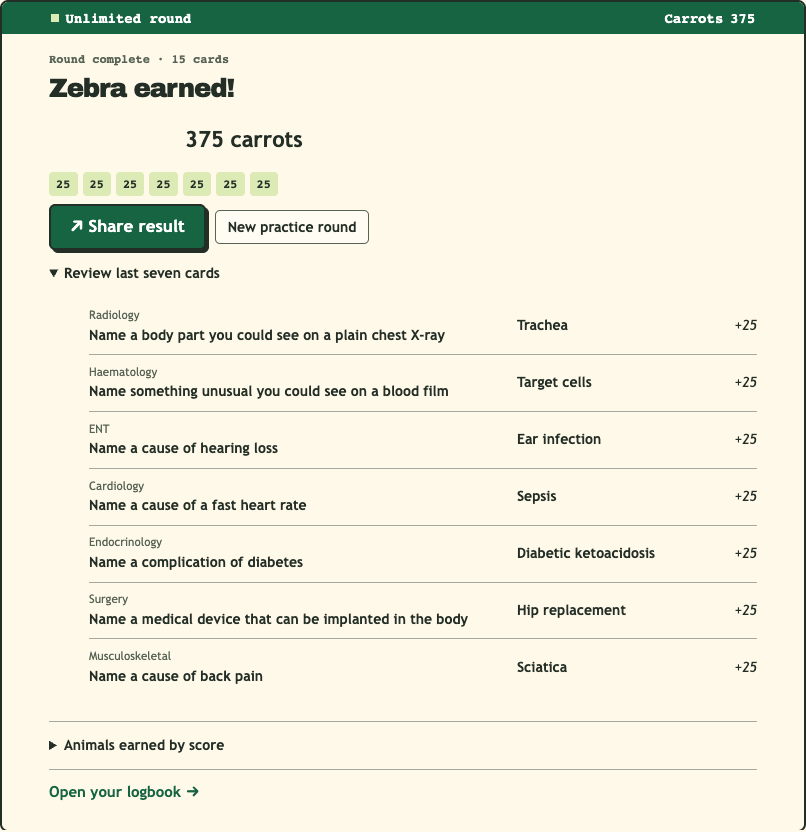
Open Review last seven cards to see each prompt, its subject, your accepted terms and their individual scores. In this example those rows add up to 175. The remaining 200 came from the first eight cards and still count toward the result. If you want a full list to study afterward, finish after seven cards. If you’re working toward a personal best, keep playing as long as you like.
Pause, finish or start a fresh deck
To pause an unfinished practice, leave the page and return in the same browser. Select Continue unlimited round to resume. If you left while typing, check the text already in the answer box and the time left on the card. If you left on a recap, your carrots for that answer have already been counted. Choose Next card when you’re ready for another timer.
To save a final score, choose Finish round on any recap, even after a single card. You can share the result or open your logbook from the results screen. Choose New practice round when you want a fresh shuffle and a score of zero. Your finished run remains in Round history, so you can compare it with the new one later.
Where to find your Unlimited best
In your logbook, look under Round records → Unlimited best for the highest total you’ve finished in this browser. Round history also shows the card count and animal for each finished practice. Compare runs of a similar length if you’re trying to improve your choice of terms. A longer run gives you more chances to score, even if every answer earns the same tier.
For a short practice target, pick the same stopping point for two runs. With four cards worth 25 each, you’ll finish on 100 carrots. Answer one of those cards at the 50-carrot tier on your next four-card attempt and you’ll finish on 125. The card count in Round history lets you find both results later.
Practice scores and the deck you’re working through stay in this browser on this device. Clearing the site’s browser data removes them. Opening a shared result lets a friend start their own practice. For a challenge with the same seven prompts in the same order for everyone, play today’s daily round. To try a particular past set again, pick its date in the archive.
Zebra Krillion Unlimited FAQ
Why did I recognize card 15?
You’ve played all 14 prompts once. The game reshuffles them for the next deck, and you keep the carrots you’ve earned.
How does my practice score compare with a daily score?
Both modes use the same carrot tiers. A daily total covers seven cards. In practice you choose when to finish, so check the card count before comparing totals.
Does finishing practice extend my daily streak?
Only a completed daily round counts toward your streak. You can play as many practice rounds as you like between daily games.
How do I resume a round or find a finished score?
On the same device, reopen this page in the browser you used and select Continue unlimited round. Finished scores appear in your logbook in that browser. Clearing site data erases both progress and scores.